
← All features
Automation

Smart Auto-Transfer Split

Decide the split once — savings and giving happen on autopilot.

Instead of manually moving money after every allowance, set a percentage that automatically flows into savings and another into charity the moment an allowance lands. Adjust it in 5% steps from 0–100%, and let your child fine-tune their own split from their own screen if you want them practising the decision themselves.

🔄 Noa's Split Allowance: ₪50/wk
💳 Spending 70% ₪35
🐷 Savings 20% ₪10
🫶 Charity 10% ₪5
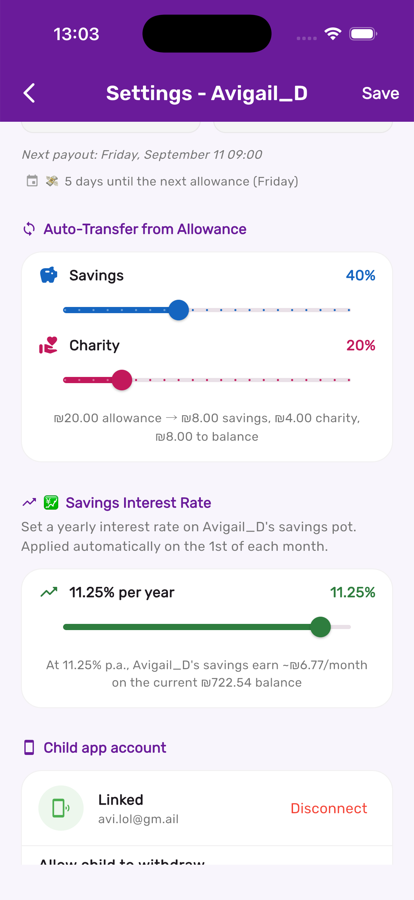
Auto-transfer sliders for savings and charity in Kupa3

Drag two sliders, see the split instantly

In the same child-settings screen as the allowance, set a savings percentage and a charity percentage. The exact shekel breakdown of the next payout updates live underneath.

The transfer happens the moment allowance lands

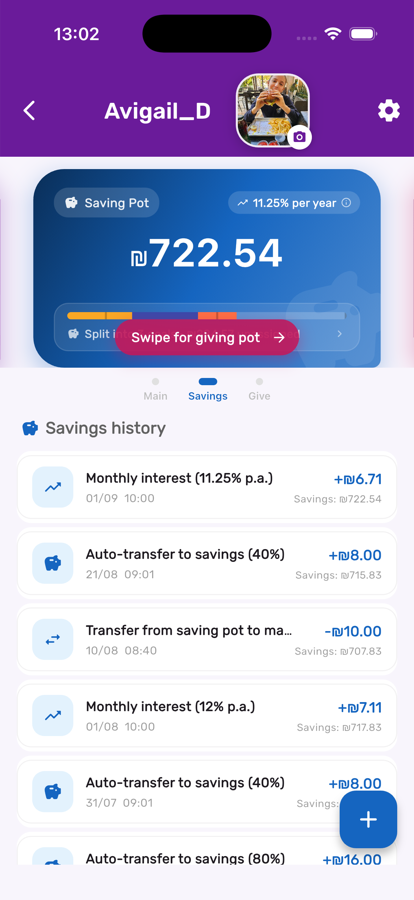
No extra tap required — the savings pot's own history shows the auto-transfer arriving automatically, every single payday, right alongside interest and manual transactions.

Auto-transfer entry in the savings pot history in Kupa3

Three steps, start to finish

1

Set the sliders

During child setup, or anytime after in the child's settings, drag the savings and charity sliders to the percentage you want automatically set aside.

2

Let allowance do the rest

Every time the weekly allowance runs, it reads the current split and routes the money automatically — no extra taps required.

3

Hand over control gradually

Let older kids adjust their own split from their screen. It's a safe way to practise budgeting decisions with real money.

Get the most out of it

💡

Start conservative — 10–20% to savings and 5–10% to charity is an easy on-ramp for younger kids.

💡

Revisit the split after a birthday or allowance raise; what felt right at 8 might feel light at 11.

💡

The split only applies to automatic allowance payouts — manual deposits and chore bonuses land fully in the main pot unless you move them yourself.

Works great with