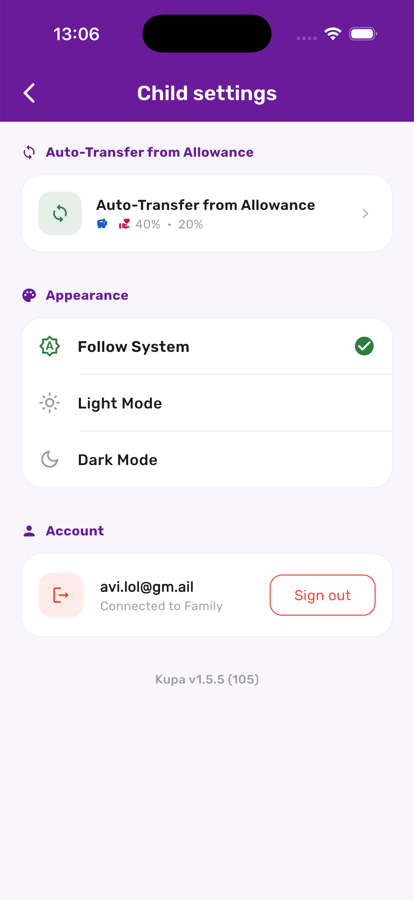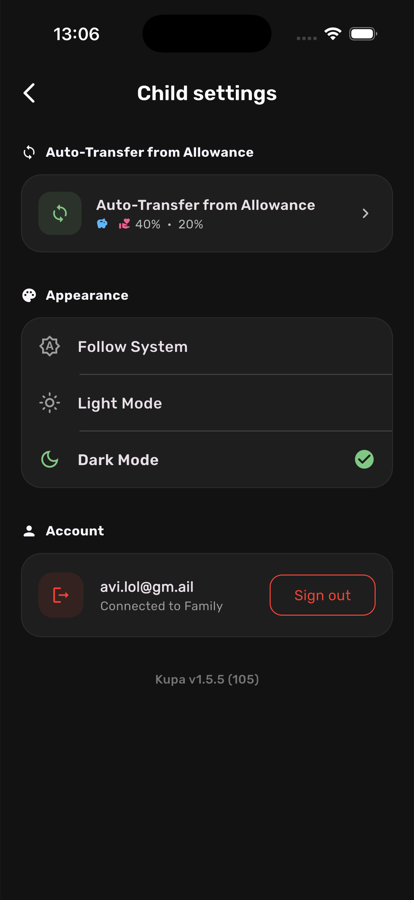

A theme that matches your eyes, your room, and your time of day.
Every screen in Kupa3 — parent dashboard, child view, chores, settings — has a fully designed dark theme, not just an inverted colour filter. Whether you prefer a clean, bright look during the day or a low-glare dark theme for evening check-ins, Kupa3 adapts instantly.
In Appearance settings, choose whether Kupa3 should follow the device's own theme automatically, or lock to one look regardless of what the rest of the phone is doing.
The moment Dark Mode is selected, every screen — balances, charts, chore cards, settings — switches over with no restart, no flicker, no half-themed screens.
Find the theme toggle in your profile settings — parent and child accounts each choose their own.
Switch anytime; the whole app, including charts, balances, and chore cards, re-themes instantly with no restart needed.
Choose to match your device's system theme automatically, or lock Kupa3 to one look regardless of what the rest of your phone is doing.
Dark mode is genuinely easier on the eyes for a quick balance check at night — a small comfort that adds up.
Kids and parents can each pick their own theme — one doesn't have to match the other.
If colours ever look off after a system update, toggling the setting off and back on refreshes the theme instantly.