

← All features
Protection

Bank-Grade Security

Your family's financial data, locked behind the same tech as your banking apps.

Protect the whole app with Face ID, Touch ID, or fingerprint, backed by a configurable auto-lock timeout that matches your family's routine. Every role — Admin, Co-Parent, and Child — is enforced not just in the app's screens but at the database level, so nobody ever sees or touches data outside their permission.

🔒 Security Face ID on
🔐 App Lock Face ID ✅ Enabled
⏱️ Auto-lock After 1 min Active
🛡️ Role rules Child account Read-only
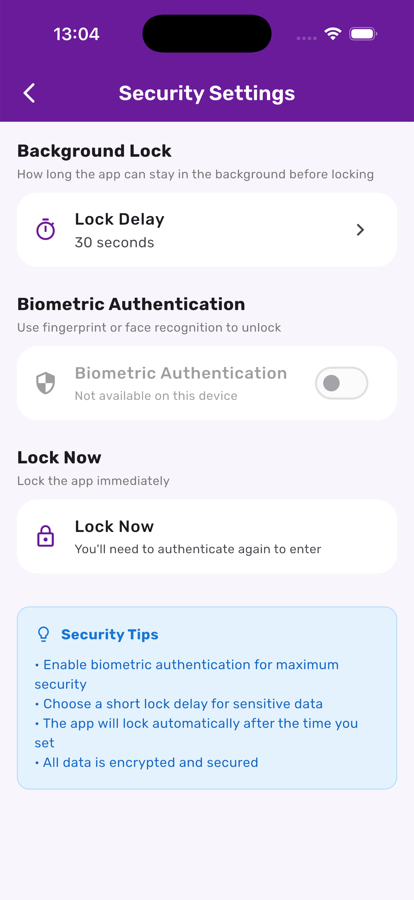
Security settings screen in Kupa3

One screen for lock delay, biometrics, and instant lock

From My Profile, tap Manage under Security Settings. Turn on Face ID or Touch ID, pick how long the app can sit in the background before it locks, or tap Lock Now to lock it this second.

Three steps, start to finish

1

Turn on biometric lock

Enable Face ID, Touch ID, or fingerprint from Security Settings — the app then locks on every cold start.

2

Pick your timeout

Choose immediate, 15 seconds, 30 seconds, 1, 5, or 15 minutes for background re-lock, or lock manually anytime with one tap.

3

Trust the role boundaries

Firestore rules enforce exactly what each role can read or write — a child's app simply cannot request data it isn't allowed to see, even if it tried.

Get the most out of it

💡

A short timeout makes sense on a shared family tablet; a longer one is fine on a parent's personal phone.

💡

Biometric fallback to your device passcode means you're never locked out even if Face ID has a bad moment.

💡

Security here isn't a bolt-on — every financial write, from an allowance run to a single deposit, is validated server-side before it's ever accepted.

Works great with