
← All features
New

Savings Goals

Turn 'I want a bike' into a jar that visibly fills up.

Savings goals let a child split their savings pot into named targets — 'New Bike 🚲', 'Summer Trip ✈️', 'New Headphones 🎧' — each with its own colour, emoji, and optional target amount. The savings balance itself never changes; goals are just a label on money that's already there, so allocating and reshuffling between goals is instant and safe.

🐷 Noa's Goals 2 active
🚲 New Bike ₪450 / ₪800 56%
✈️ Trip Fund ₪120 / ₪300 40%
🎧 Headphones ₪90 / ₪90 ✅ Reached!
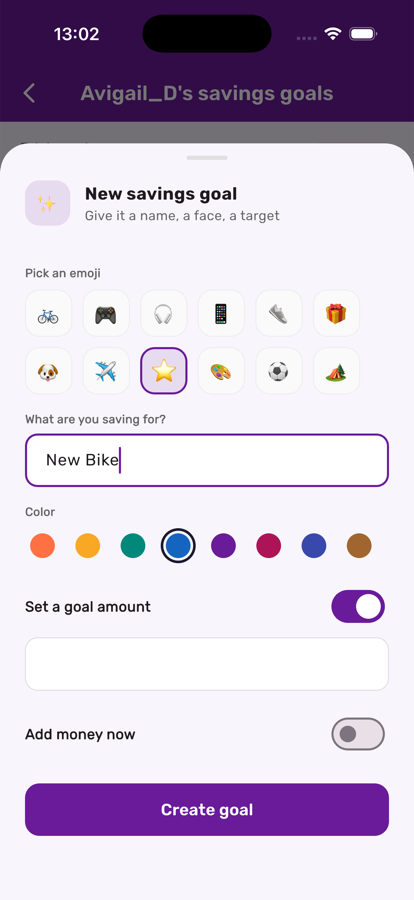
Creating a savings goal in Kupa3

Name it, pick an emoji and a color, set a target

From the savings screen, tap Add. Choose an emoji, a name, a color, and — if there's a specific price in mind — a target amount. Leave the target off if it's just a jar to fill.

Every goal, its progress, right there

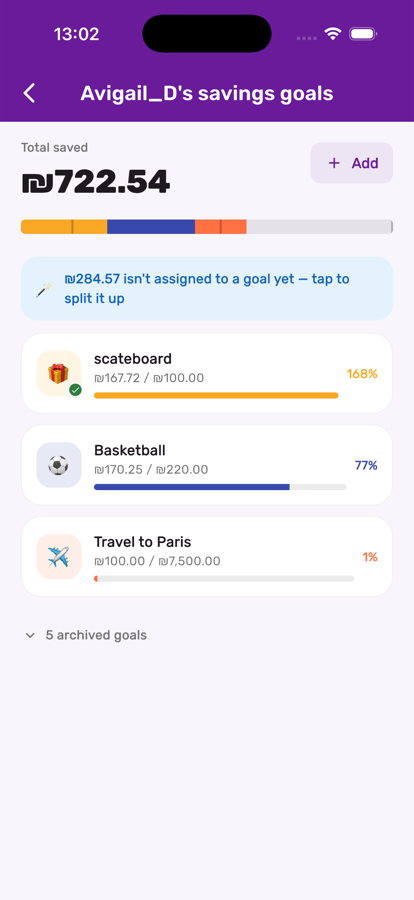
The goals screen lists every active goal with a progress bar and percentage, calls out money still unassigned, and keeps completed or abandoned goals one tap away in an archive.

Savings goals list with progress bars in Kupa3

Three steps, start to finish

1

Create a goal

Give it a name, pick an emoji and colour, and optionally set a target amount. Leave the target blank if it's just a jar to fill without a finish line.

2

Allocate savings toward it

Move money from unallocated savings into one or more goals. Anything not assigned to an active goal stays flexible as 'unallocated.'

3

Celebrate hitting it

The first time a goal's allocation reaches its target, Kupa3 marks the moment and celebrates it — a small, memorable milestone for the child.

Get the most out of it

💡

Let your child name and pick the emoji themselves — ownership of the goal is what makes saving toward it feel worth it.

💡

Archive a goal instead of deleting it once it's served its purpose; the money folds straight back into unallocated savings.

💡

Multiple goals at once work well for older kids — it mirrors real budgeting, prioritising several things at different paces.

Works great with